Steps
In FluxFlow, the concept of a step holds paramount importance. A step represents a discrete unit of work or an action that is executed within a workflow. Whether you’re automating business processes, orchestrating complex tasks, or streamlining operations, understanding and effectively utilizing steps is vital for creating efficient and robust workflows.
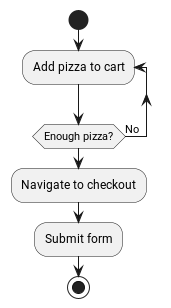
A step serves as a building block of a workflow, defining a specific task that needs to be performed. It encapsulates the instructions, dependencies, and conditions required to accomplish a particular action within the larger workflow. By breaking down complex processes into smaller, manageable steps, workflow engines enable the systematic execution of tasks and facilitate efficient coordination among various components.
Steps within a workflow are designed to be modular and reusable, allowing for flexibility and adaptability. Each step represents a logical unit of work, such as data manipulation, decision-making, integration with external systems, or invoking services. These units can be combined, reordered, and interconnected to construct powerful and versatile workflows that automate complex business processes.
When designing a workflow, the selection and arrangement of steps play a crucial role in achieving desired outcomes. These steps may include actions like data transformation, conditional branching, error handling, event triggers, approvals, notifications, and many others.
Steps are not only responsible for executing tasks but also for managing the flow of control within a workflow. They define the order in which actions are performed and provide mechanisms to handle exceptions, handle success or failure scenarios, and handle branching based on conditions. This control flow management ensures that workflows progress smoothly, enabling efficient resource utilization, error handling, and adaptability to changing conditions.
General
Rules of steps
Steps always and unambiguously belong to one workflow. Even though a workflow can have multiple steps, a step can only be associated with one single workflow.
-
manipulate their own data
-
manipulate their workflow’s data
-
transition to or fork new steps
-
schedule jobs
-
call other services
-
interact with other workflows and steps using the FluxFlow API services
- directly manipulate other workflows or steps (without using the FluxFlow API)
Types of steps
Currently, the only supported step type is a stateful step. A stateful step can have persistent data and define actions, which can be externally manipulated or invoked.
Step data
Many workflow steps, especially those performed by users, need some kind of input. As they are only required for a particular step, these inputs are called "step data" or "data" for short.
As the name suggests, a step data entry can also be read externally and therefore be used to export information. In fact, every step data entry can be read while not everyone can be written externally.
Step identifiers
A step identifier uniquely identifies a step within its workflow and is assigned by FluxFlow. Within a given workflow, there will be no steps sharing a common identifier. However, steps from different workflows are not guaranteed to have distinct identifiers. In order to globally refer to a single instance of a step, the combination of the step’s and workflow’s identifier should be used.
Step definitions
It is important to distinguish between a step and a step definition. While both terms are closely related and often used interchangeably, they refer to different aspects of a workflow.
A step is an instance of an action or task within a workflow. It represents a specific unit of work that needs to be performed. For example, a step could involve sending an email, making an API call, performing a calculation, or executing a decision-making process.
On the other hand, a step definition refers to the blueprint or template that defines the structure and behavior of a step. It serves as a reusable definition or configuration for a specific type of step within a workflow. A step definition typically includes information such as the input parameters required by the step, the expected output or result, any dependencies or conditions, and the logic or code associated with the step.
In essence, a step definition provides the instructions and specifications for how a step should be executed, while a step represents the actual occurrence or instantiation of that step within a workflow.
Step kinds
Similar to the step identifier, a step kind identifies a step definition. As step definitions are not scoped to a workflow, the step kind is globally unique.
Defining steps
Basics
A step can be defined by modelling it as a class.
Minimal step definition
class SubmitPizzaOrderStep {
}
Even though the ...Step prefix is not required by FluxFlow, it can
help developers in recognizing that this class is indeed a FluxFlow step
definition.
The @Step annotation can be used to define a custom step kind or to
make it absolutely clear, that the annotated class is a step definition.
Step definition declaring a custom kind submit-pizza-order
import de.lise.fluxflow.stereotyped.step.Step

@Step("submit-pizza-order")
class SubmitPizzaOrderStep {

}
If the @Step annotation is omitted or used without providing a custom
step kind, the classes fully qualified and canonical name will be used.
Step definition with default kind
import de.lise.fluxflow.stereotyped.step.Step

@Step
class SubmitPizzaOrderStep {

}
In order to prevent naming collisions when using custom names, it is recommended to only assign a custom kind when absolutely needed.
Adding step data
A step data entry can be easily defined by declaring a property within
the step definition class. The property must be publicly accessible in
order for FluxFlow to pick it up. If the property is read only (val),
the resulting step data will be read only too.
Let’s say we want to allow the user to enter his mail address. This can
be archived by adding a mutable string property mailAddress (the
property name will become the data’s kind).
Step definition with simple step data
class SubmitPizzaOrderStep {
    var mailAddress: String? = null
}
We could also define the property using a default constructor, allowing us to omit the default initialization.
Step data declared using the primary constructor
class SubmitPizzaOrderStep(
    var mailAddress: String?
) {
}
Similar to the @Step annotation, the @Data annotation can be used to
explicitly mark the property as a step data entry or to define a custom
data kind.
Step data definition with explizit @Data annotation
import de.lise.fluxflow.stereotyped.step.data.Data

class SubmitPizzaOrderStep(
    @Data("mail-address") // or @Data
    var mailAddress: String?
) {
}
It is also possible to add step data that utilizes getter and setters to dynamically values or to react to modifications.
class SubmitPizzaOrderStep(
    var mailAddress: String?
) {

    val hasMailAddress: Boolean
        get() = mailAddress != null

}
Inactive Modifications
By default, changes to step data are not allowed when the step is no longer active.
There is a global setting fluxflow.data.allow-inactive-modification to allow changes to inactive step data.
Furthermore, the global setting can also be overwritten for each StepData using the property modificationPolicy in the @Data annotation.
class SubmitPizzaOrderStep(
    @Data(modificationPolicy = ModificationPolicy.AllowInactiveModification)
    var mailAddress: String?
)
Listen for changes
Sometimes it is required to react whenever a certain value changes. The straight forward approach is to declare a property setter, that checks if the new value is different from the previous value.
Straight forward approach on listening for step data changes (don’t do this)
class SubmitPizzaOrderStep {
    private var _mailAddress: String? = null

    // DON'T DO THIS
    var mailAddress: String?
        get() = _mailAddress
        set(value) {
            if (value != _mailAddress) {
                // Do something
            }
            _mailAddress = value
        }
}
This approach has a few major drawbacks, and should only be used in rare circumstances (such as logging).
Whenever FluxFlow needs to activate the above step, the property’s setter will be invoked in order to restore the previous step state. Therefore, the setter would always see an initial "update" whenever the step is getting initialized.
The preferred way to react to data changes is to declare a data
listeners. A step data listener is a special (public) step function,
which is annotated with @DataListener. It will be invoked whenever the
observed step data actually changes. The annotation itself expects a
string that will refer to the step data to be observed using its step
data kind.
Example of a basic step data listener
class SubmitPizzaOrderStep(
    var mailAddress: String?
) {
    @DataListener("mailAddress") //
    fun onMailAddressChange() {
        // do something //
    }
}
-
Registers the
.onMailAddressChangefunction as a data listener, observing themailAddressstep data. -
Is invoked everytime a different value is assigned to
mailAddress.
In order to receive the old and updated values, the function can declare two parameters matching the data’s type.
Example of a step data listener receiving the origin and updated values
class SubmitPizzaOrderStep(
    var mailAddress: String?
) {
    @DataListener("mailAddress")
    fun onMailAddressChange(
        oldValue: String?, //
        newValue: String? //
    ) {
        Logger.info("Mail address changed from {} to {}", oldValue, newValue)
    }

    private companion object {
        val Logger = LoggerFactory.getLogger(SubmitPizzaOrderStep::class.java)!!
    }
}
-
Will be assigned to the pre-update value
-
Will be assigned to the new/updated value
Be sure that the parameter is always assignable from the actual value types. Also consider nullability - if the step data is nullable, the parameters must be nullable as well.
FluxFlow will determine which parameter receives the old and which one receives the updated value by reflecting on their names and positions. Parameters having a name containing "old" or "original" will receive the pre-update value, while parameters with "new" or "updated" in their name will receive the new value. If the names do not match, the parameter order is consulted. Whereas the first assignable parameter will always receive the old value, while the second one will receive the updated value.
In order to listen for multiple step data changes, the annotation can be
repeated for different step data kinds. Within the step data listener
you may distinguish them, by defining a DataKind parameter. This
parameter will receive the DataKind object describing the step data
that changed.
Listening for different step data changes having the same type
class SubmitPizzaOrderStep(
    var mailAddress: String?,
    var alternativeMailAddress: String?
) {
    @DataListener("mailAddress")
    @DataListener("alternativeMailAddress")
    fun onMailAddressChange(
        dataKind: DataKind, //
        oldValue: String?,
        newValue: String?
    ) {
        Logger.info("{} changed from {} to {}", dataKind, oldValue, newValue)
    }

    private companion object {
        val Logger = LoggerFactory.getLogger(SubmitPizzaOrderStep::class.java)!!
    }
}
- The
dataKindwill contain the kind of the step data that changed.
Be extra cautious when listening for changes of different types, as the listener function’s parameters must be assignable from all observed step data types.
Listening for different step data changes having different types
class SubmitPizzaOrderStep(
    var mailAddress: String?,
    var postalAddress: Address?
) {
    @DataListener("mailAddress")
    @DataListener("postalAddress")
    fun onMailAddressChange(
        dataKind: DataKind,
        oldValue: Any?,
        newValue: Any?
    ) {
        Logger.info("{} changed from {} to {}", dataKind, oldValue, newValue)
    }

    private companion object {
        val Logger = LoggerFactory.getLogger(SubmitPizzaOrderStep::class.java)!!
    }
}
You can also declare additional parameters which will be resolved using dependency injection.
Continuing the workflow on data changes
Data listeners can also return a
Continuation, that can be used to control the workflow’s execution.
For more details regarding continuations, see Continuing the workflow using return values.
Adding metadata to step definitions
Step data can also carry metadata.
As data is always tied to a specific step, it doesn't have any state on its own.
Consequently, metadata is always static and only present on the DataDefinition.
Metadata can be applied in the same way as it is done for other workflow elements. More details can be found in the step's metadata section.
import de.lise.fluxflow.stereotyped.metadata.Metadata
import de.lise.fluxflow.stereotyped.step.Step

@Metadata("displayName")
annotation class DisplayName(val value: String)

@Step
class EnterContactDetails {
    @DisplayName("Given name")
    var firstname: String = ""
}
Caution: Be careful when applying annotations to properties defined by Kotlin's default constructor as they are by default applied to the corresponding constructor parameter.
@Step
class EnterContactDetails(
    @property:DisplayName("Given name")
    var firstname: String = ""
)
Definition of metadata
Step definitions can have an arbitrary set of key-value pairs, that can be used to provide additional context. Metadata is considered to be static information on a step or its definition.
Step definition metadata is exposed using Step.definition.metadata.
This property holds a map that is never null and contains a mapping for
arbitrary keys to some values. A value associated with a key is
guaranteed to always be non-null.
Customizing metadata entries
The metadata will automatically be obtained from annotations that have
been applied to a step’s definition.
All annotations that shall be used as a metadata source must themselves be meta-annotated with @Metadata.
By default, metadata keys are implicitly obtained using the logic described by the following listing.
Implicit logic for obtaining metadata key-values
If the applied annotation has
- no property
key: the key as specified within the@Metadataannotation;value: static value oftrue
- a single property
key: the key as specified within the@Metadataannotation;value: the property’s value
- more than one property
key: the key as specified within the@Metadataannotation +"."+ the property’s name;value: the property’s value
Creation and usage of a metadata annotation
import de.lise.fluxflow.stereotyped.metadata.Metadata

@Metadata("displayName")
annotation class DisplayName(
    val name: String
)

@DisplayName("Complete order")
class CompleteOrderStep {
    // actual step implementation
}
It is also possible to customize the property name that will be used in case of annotations having
multiple properties.
To do so, the @Metadata meta-annotation can be applied to the annotation’s property using @get:Metadata.
Example of applying @Metadata to properties
@Metadata("displayName")
annotation class DisplayName(
    @get:Metadata("long")
    val longName: String,
    @get:Metadata("short")
    val shortName: String
)
If at least on property is annotated with @Metadata, all
other unannotated properties will be ignored.
Actions
A step can define on or more actions. An action hereby represents functionality, that can be invoked on that step. As such, actions are modeled by declaring functions within the step definition class.
Invoking an action is normally considered to be step-completing. After
an action completed successfully, the owning step is therefore going to
have the Completed status.
If automatic step completion is not desired, refer to section Non-completing actions.
Basic actions
Each step function (except those inherited from Object or Any) are
considered as an Action as long as they fulfill the following
prerequisites.
-
The function’s visibility is public
-
The function is not abstract
-
The function is not static
-
If the function is
-
not annotated with
@Action, it does not require parameters -
annotated with
@Action, it requires only injectable parameters
-
Therefore, a basic action definition could look like the one shown below.
Basic step action
class SubmitPizzaOrderStep {
    fun submit() {
        // send notification to the restaurant
    }
}
In order to distinguish between multiple actions, the function’s name is
used as the action’s kind. If a function should not be considered as an
action or the action’s kind should be set explicitly, the @Action
annotation can be used.
As soon as a function is explicitly marked as an action (using the
@Action annotation), the implicit discovery will be disabled.
Possible use cases for explicit @Action declarations
@Step
class SubmitPizzaOrderStep {
    @Action //
    fun submit() { /* ... */ }

    @Action("cancel-order") //
    fun cancel() { /* ... */ }

    fun iAmNotAStep() { /* ... */ } //
}
-
This explicitly marks the annotation function to be treated as a step action. All other functions are now ignored, as long as they are not also explicitly annotated.
-
In this example, the action’s kind will be explicitly set to "cancel-order".
-
This function will not be treated as an action, even though it would satisfy all requirements. This is because implicit discovery has been disabled, as this step has at least one explicitly annotated function.
Injection into action functions
As mentioned in orderedlist_title, it is possible to inject additional dependencies using an action function’s parameters.
Currently, injection is only supported for values that can be obtained from the IoC container.
If an action function requires additional parameters, it must be
annotated with @Action.
This feature is especially useful if your step action needs to invoke external (stateless) functionality, which is only required for a specific action. Adding such a dependency using a constructor parameter would still be possible, but might complicate creating new instances of that step.
The following two examples demonstrate the problem that can arise if stateless dependencies are injected using constructor parameters and how this can be solved using action parameter injection.
Example of dependencies obtained from constructor injection
@Service
class MailService { //
    fun sendMail(receiver: String, message: String) {}
}

@Step
class CompleteOrderStep(
    val customerMailAddress: String,
    private val mailService: MailService //
) {
    @Action
    fun completeOrder() {
        mailService.sendMail(customerMailAddress, "Thank you for your order") //
    }
}

@Step
class ReviewShoppingCart(
    val customerMailAddress: String,
    private val mailService: MailService //
) {
    @Action
    fun proceedToCheckout(): CompleteOrderStep {
        return CompleteOrderStep(
            customerMailAddress,
            mailService //
        )
    }
}
-
The mail service provides external functionality, which is independent of a workflow’s current state.
-
The step that completes an ordering process requires this functionality to send an order summery.
-
Technically, this external dependency could be accessed using constructor parameter injection.
-
However, since we might need to create instances of that step when transitioning into it, we are therefore required to provider an actual value for that constructor parameter.
-
This forces upstream steps to also declare
MailServiceas a dependency.
This problem can be avoided, by directly injecting the @MailService
into the completeOrder action.
Functionally identical workflow that uses action parameter injection
@Service
class MailService {
    fun sendMail(receiver: String, message: String) {}
}

@Step
class ReviewShoppingCart(
    val customerMailAddress: String
) {
    @Action
    fun proceedToCheckout(): CompleteOrderStep {
        return CompleteOrderStep(customerMailAddress)
    }
}

@Step
class CompleteOrderStep(
    val customerMailAddress: String
) {
    @Action
    fun completeOrder(mailService: MailService) {
        mailService.sendMail(customerMailAddress, "Thank you for your order")
    }
}
Continuing the workflow using return values
A step action can use the returned value to control the future workflow behavior.
Type |
Description |
Explizit |
Implicit |
A step continuation indicates that the workflow should be continued with a new step. |
Returning
|
Returning an instance of a step definition. |
|
A no-op continuation indicates that no further operations should be performed. |
Returning
|
Returning nothing (e.g. declaring a
|
|
A job continuation indicates that the workflow should schedule a new job, which gets executed at a specified time. |
Returning
|
- |
|
A cancel jobs continuation indicates that FluxFlow should cancel previously scheduled jobs without replacing them with new jobs. |
Returning
|
- |
|
A multiple continuation indicates that the workflow should continue with multiple continuations at the same time. |
Returning
|
- |
|
A rollback continuation indicates that the previous step should be reactivated while (by default) canceling the current one. |
Returning
|
- |
|
A workflow continuation indicates the FluxFlow should start a new workflow. |
Returning
|
- |
Possible ways of continuing a workflow after a step action has been executed
Step continuation
A step continuation continues the current workflow by executing the specified step.
Example of continuing a workflow with a new step using explicit or implicit declarations
class SubmitPizzaOrderStep {
    fun submitImplicit(): CompleteOrderStep { //
        return CompleteOrderStep()
    }

    fun submitExplicit(): Continuation<CompleteOrderStep> { //
        return Continuation.step(CompleteOrderStep())
    }
}

class CompleteOrderStep
-
Continue with a
CompleteOrderStepby returning its definition. -
Continue with a
CompleteOrderStepby returning an explicit continuation.
No-op continuation
If an action function is defined as a void method or returns a
Continuation.none(), no further operations will be performed.
Completing a step without triggering new operations
class CompleteOrderStep {
    fun completeImplicit() {} //
    fun completeExplicit(): Continuation<*> { //
        return Continuation.none()
    }
}
-
Actions returning nothing will trigger no additional operations.
-
This is equivalent to returning a
Continuation.none().
Job continuation
See Starting jobs using a continuation.
Cancel jobs continuation
See Job cancellation.
Multiple continuation
A "multiple continuation" can be used if the workflow should continue with more than one operation at the same time.
class NotifyCustomerStep { /* ... */ }
class NotifyRestaurantStep { /* ... */ }

class SubmitPizzaOrderStep {
    fun submit(): Continuation<*> {
        return Continuation.multiple( //
            Continuation.step(NotifyCustomerStep()), //
            Continuation.step(NotifyRestaurantStep())
        )
    }
}
-
Create individual continuations that should be executed after this action
-
and wrap them within
Continuation.multiple.
Rollback continuation
A "rollback continuation" can be used to restore the previous step. If such continuation is returned, FluxFlow will try to determine the previous step and reactive it if necessary. The "previous step" is hereby defined as the step that created the currently executing workflow object.
class ModifyBasketStep {
    // ...

    fun processToCheckout(): SubmitPizzaOrderStep {
        return SubmitPizzaOrderStep() //
    }

}

class SubmitPizzaOrderStep {
    fun submit() {
        // do actual checkout
    }

    fun cancel(): RollbackContinuation {
        return Continuation.rollback<ModifyBasketStep>() //
    }
}
-
The
processToCheckoutaction will start a newSubmitPizzaOrderStepand is completed afterward. -
Whenever the
cancelaction within theSubmitPizzaOrderStepis invoked, FluxFlow will search for the previous step (in this case being theModifyBasketStep) and reactivate it.
It is the developer’s responsibility to make sure that there actually is
a previous step. Otherwise, a InvalidContinuationException will be
thrown.
The rollback annotation will not do anything other than reactivating the previous step. This is especially true for any changes and actions that have been run before the rollback.
The generic parameter of Continuation.rollback<TPreviousStep> serves
no other purpose than being a hint to the developer. It can be used to
indicate what the previous step might have been and to enable an IDE’s
"find usages"-feature.
If the previous step kind may vary or is unknown, the type wildcards
(* or ?) might be used.
The rollback continuation will (by default) cancel the currently
executing step. In order to keep the current step active as well, either
set the @Action(statusBehavior=...) annotation or explicitly specify
the continuation’s status behavior.
@Action(statusBehavior = ImplicitStatusBehavior.Preserve)
fun cancel(): Continuation<*> {
    return Continuation.rollback<ModifyBasketStep>()
        .withStatusBehavior(StatusBehavior.Preserve)
}
Workflow continuation
A "workflow continuation" can be used to start an entirely new workflow.
The current workflow can either be continued normally, be removed once
the new workflow started or replaced, depending on the specified ForkBehavior.
class SubmitPizzaOrderStep {
    fun submit(): Continuation<*> {
        val feedback = CustomerFeedback()
        return Continuation.workflow( //
            feedback,
            Continuation.step(feedback)
        )
    }
}

class CustomerFeedback {/** ...**/ }

class AskForFeedbackStep(
    feedback: CustomerFeedback
) {
    /** ... **/
}
- Starts the
AskForFeedbackStepwithin a new workflow having its own workflow model (CustomerFeedback).
Fork behavior
By default, the current workflow is continued normally (ForkBehavior.Fork). The other options are to remove the current workflow (ForkBehavior.Remove) or to replace it with the new one (ForkBehavior.Replace). This can either
be specified explicitly or changed, using on of the following methods.
fun submit(): Continuation<*> {
    val workflowModel = CustomerFeedback()
    val initialStep = Continuation.step(AskForFeedbackStep(workflowModel))

    val defaultBehavior = Continuation.workflow(workflowModel, initialStep)

    val explicitFork = Continuation.workflow(workflowModel, initialStep, ForkBehavior.Fork)
    val explicitForkFromBuilder = Continuation.workflow(workflowModel, initialStep)
        .withForkBehavior(ForkBehavior.Fork)

    val explicitRemove = Continuation.workflow(workflowModel, initialStep, ForkBehavior.Remove)
    val explicitRemoveFromBuilder = Continuation.workflow(workflowModel, initialStep)
        .withForkBehavior(ForkBehavior.Remove)

    val exlicitReplace = Continuation.workflow(workflowModel, initialStep, ForkBehavior.Replace)
    val explicitReplaceFromBuilder = Continuation.workflow(workflowModel, initialStep)
        .withForkBehavior(ForkBehavior.Replace)

    return defaultBehavior
}
Replace
The current workflow will be replaced by the new one. This means that new workflow will get the current workflow's identifier and the current workflow will be removed. No WorkflowDeletedEvent will be emitted.
Additionally, the replacement scope can be set.
The scope defines which workflow elements will be replaced.
By default, no workflow elements will be replaced.
The scope can be set using the withReplacementScope function or the replaceScope parameter of the Continuation.workflow function.
The following scopes are available:
WorkflowElement.Step: All steps of the current workflow will be replaced.WorkflowElement.Job: All jobs of the current workflow will be replaced.WorkflowElement.ContinuationRecord: All continuation records of the current workflow will be replaced.
fun submit(): Continuation<*> {
    val workflowModel = CustomerFeedback()
    val initialStep = Continuation.step(AskForFeedbackStep(workflowModel))

    val replaceWorkflow = Continuation.workflow(
        workflowModel,
        initialStep,
        ForkBehavior.Replace,
        setOf(
            WorkflowElement.Step,
            WorkflowElement.Job,
            WorkflowElement.ContinuationRecord,
        )
    )

    return replaceWorkflow
}
Non-completing actions
A step is marked as being Completed once an action has been
successfully executed. However, it is possible to change this behavior
if the step should remain in its state after an action ran.
This can be done in one of the following ways, demonstrated by the example below.
class CompleteOrderStep

class SubmitPizzaOrderStep { //
    @Action(statusBehavior = ImplicitStatusBehavior.Preserve)
    fun printSummary() {
        // do work
    }

    @Action(statusBehavior = ImplicitStatusBehavior.Complete)
    fun complete(): CompleteOrderStep {
        return CompleteOrderStep()
    }
}

class SubmitPizzaOrderStep { //
    fun printSummary(): Continuation<*> {
        // do work
        return Continuation.none()
            .withStatusBehavior(StatusBehavior.Preserve)
    }

    fun complete(): Continuation<CompleteOrderStep> {
        return Continuation.step(CompleteOrderStep())
            .withStatusBehavior(StatusBehavior.Complete)
    }
}
-
The first example shows how the automatic step completion can be controlled using the
@Actionannotation. -
The second implementation behaves the same, while using explicitly returned continuations.
All status behaviors declared using the @Action annotation (except
ImplicitStatusBehavior.Default), will override behaviors specified by
explicitly returned continuations.
Adding metadata to actions
Like steps and step definitions, an action can also have metadata attached to it. To do so, simply apply the relevant annotations to the action function in question.
Example of an annotated action function
annotation class DisplayName(name: String)

@Step
class CompleteOrderStep {

    @Action
    @DisplayName("Complete your order") //
    fun completeOrder() {

    }
}
- The action will have a metadata entry of
displayName="Complete your order"
In order to access an action’s metadata, the
Action.definition.metadata property can be used.
Refer to section Definition of metadata for more information on how metadata works and how the generated metadata can be customized.
Using steps
Assigning step data
A step's data can be modified using the StepDataService.
Please note that the data itself must be modifiable (= implement the ModifiableData interface).
import de.lise.fluxflow.api.step.stateful.data.Data
import de.lise.fluxflow.api.step.stateful.data.StepDataService
import java.time.Instant

class ModificationHistoryService(private val stepDataService: StepDataService) {
    fun assignLastModifiedDate(data: Data<Instant>) {
        stepDataService.setValue(data, Instant.now())
    }
}
The setValue() function also accepts an additional context parameter,
allowing additional information to be passed along.
This extra information can be obtained by event listeners (see FlowListener) using the FlowEvent.context property.
import de.lise.fluxflow.api.step.stateful.data.Data
import de.lise.fluxflow.api.step.stateful.data.StepDataService
import java.time.Instant

/**
 * Provide additional context information
 */
class ModificationHistoryService(private val stepDataService: StepDataService) {
    fun assignLastModifiedDate(data: Data<Instant>, currentUser: User) {
        stepDataService.setValue(
            currentUser,    // context information
            data,           // data to be updated
            Instant.now()   // value to be assigned
        )
    }
}

/**
 * Access additional context information
 */
class HistoryService: FlowListener {
    private val logger = LoggerFactory.getLogger(HistoryService::class.java)

    override fun onFlowEvent(event: FlowEvent) {
        val modifyingUser = event.context as? User
        if (modifyingUser != null) {
            logger.debug("Workflow updated by user: {}", modifyingUser)
        }
    }
}
Modifying step metadata at runtime
In order to dynamically modify a step's metadata,
the StepService.setMetadata(step: Step, key: String, value: Any?) function can be used.
Metadata set using this function will overwrite or extend any statically defined metadata
(see Definition of metadata).
Existing metadata can be removed by passing a null value into the setMetadata function
or using the StepService.removeMetadata(step: Step, key: String) alias.
import de.lise.fluxflow.api.step.Step
import de.lise.fluxflow.api.step.StepService

class UserTaskService(
    private val stepService: StepService
) {
    fun assignUsers(step: Step, userIds: List<String>) {
        stepService.setMetadata(step, ASSIGNED_USERS_KEY, userIds)
    }

    fun clearAssignedUsers(step: Step) {
        stepService.removeMetadata(step, ASSIGNED_USERS_KEY)
    }

    private companion object {
        const val ASSIGNED_USERS_KEY = "assignedUsers"
    }
}